Learning Management Systems (LMS) are very important for creating and selling online courses. It is difficult to choose the right LMS tool for conducting courses on WordPress websites among various tools available in the market. LearnDash is a powerful tool for all types of course creators with its robust features.
In this article on LearnDash review, I will cover in more detail its features, advantages, prices, and some other factors that make LearnDash the best LMS solution for course creators.

Get the LearnDash LMS plugin for WordPress.
What is LearnDash?
LearnDash is a WordPress plugin that converts your website into an LMS (Learning Management System) with all the required features you need. It allows you to create, administer, and market online courses without needing any advanced technical knowledge.
LearnDash is popular for its unique features and user-friendly interface, allowing course creators to improve engaging, interactive, and educational content. It can manage all of your requirements when you want to develop a massive learning portal or provide a single course.
Get the LearnDash LMS plugin for WordPress.
Key Features of LearnDash
1. Course Creation and Management
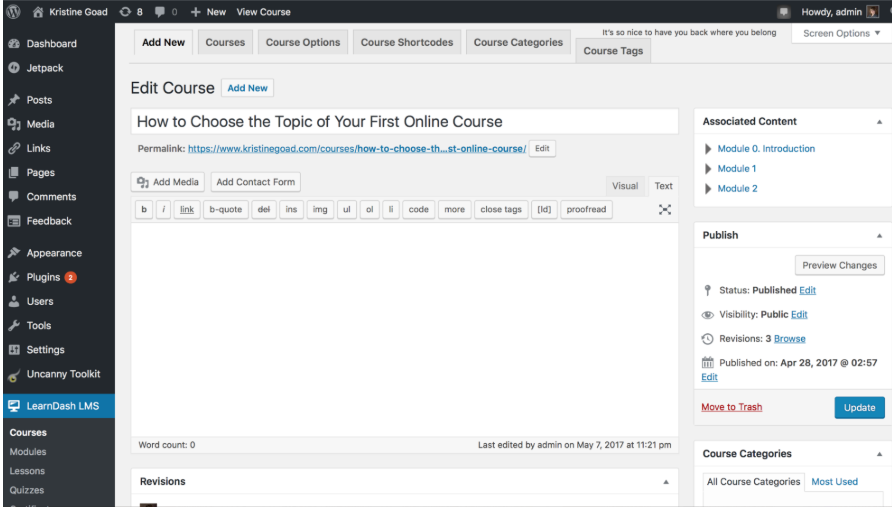
LearnDash’s most important feature is course creation capabilities. It offers a wide range of tools that make it simple to design complex learning modules with tests, homework, certificates and more. You do not need technical knowledge to use it because of its drag-and-drop interface of the course builder.
You can create multiple lessons and topics with the help of LearnDash within a single course to give your learners an easy-to-follow learning path. It allows you to create quizzes with different question types like true or false, multiple choice, and open-ended questions. It also can issue certificates and badges after successfully completing courses.
2. Restricting Content with LearnDash
This feature is important for controlling access to your courses. You can restrict content by course, lesson, or quiz based on learners’ status, subscription, or payment. You can connect with popular membership plugins like MemberPress or WooCommerce memberships for controlling access to your content.
3. Integration with WordPress User Roles
WordPress user roles easily integrate with LearnDash. Access restriction is a helpful feature of LearnDash for WordPress users. You can assign specific user rights to students with this feature. Thus, they can only access the course materials and not other sections of the website.
4. LearnDash Dashboard
The dashboard on LearnDash is easy to use and simple. From the dashboard, you can review student progress, quiz results, course overviews, and financial data for selling courses. You can easily get the information to manage your courses effectively by its clear and simple structure.
You can examine course completion rates, support students who need help, and track learner progress with visual indicators. This is an excellent tool for anyone for teaching online because it simplifies course administration.
5. Learndash’s Latest Version Features
LearnDash’s latest version features improve ease of navigation for the use of more payment gateway options like Stripe and PayPal. You can observe completion rates, better analyze student behaviour, and improve your course content based on feedback.
Pricing and Licensing

LearnDash LMS plugin offers different pricing structures based on your needs. It offers $199/year for one site, $399/year for 10 sites and $799 for unlimited. LearnDash is not the most affordable LMS option on the market, but for professional course creators, the price is not so high due to its robust features and flexibility.
Sometimes, you may find LearnDash coupon codes that offer discounts on different pricing plans.
Get the LearnDash LMS plugin for WordPress.
LearnDash Login & User Experience
The LearnDash login process is simple. Learners can create accounts by registering and log in to access their courses. Course creators can match it to their website’s identity due to its customizable login page.
Learners can review pending classes, easily track their progress, and participate in quizzes at any time. In LearnDash, users can add third-party login options like social media logins to maintain extra security layers.
Get the LearnDash LMS plugin for WordPress.
Comparison of LearnDash
LearnDash vs. Teachable
LearnDash is flexible,more customizable and integrates with WordPress. Whereas Teachable is easier for the beginners and all-in-one platform but less customizable. In pricing LearnDash offer $29/month but Teachable offer $39/month.
LearnDash vs. Thinkific
LearnDash has advanced features for WordPress where Thinkific is user-friendly, limited customization without needing WordPress. In pricing LearnDash offer $29/month but Thinkific offer $36/month.
LearnDash vs. Kajabi
LearnDash focused on course creation whereas Kajabi offers all-in-one platform for course and marketing. In pricing LearnDash offer $29/month but Thinkific offer $71/month.
Benefits of Using LearnDash
1. Flexibility and Customization
LearnDash’s high level of customization can make a course website that fulfils your needs and brand. You can install various third-party plugins, use custom themes, and change their appearance to improve the website’s functionality.
2. Expandability
LearnDash can expand your courses when you want to start from anywhere among hundreds or thousands of students. Its integration with WordPress ensures it can grow efficiently from a single course to an entire learning platform.
3. Powerful Community and Support
LearnDash offers an active, supportive community of learning professionals, developers, and course creators. LearnDash help desk or support team can solve any problems that you desire. In addition, the platform offers a lot of documentation, tutorials, and guidance to assist new learners.
4. Superior Content Delivery
You can produce exciting courses that keep learners coming back for more with LearnDash’s superior features, which include content security, automated email notifications, and course completion tracking.
Conclusion
In conclusion, for WordPress course creators, LearnDash is one of the best LMS solutions. Its comprehensive feature set-which includes easy course creation, content restriction, user role control, and easy WordPress integrations, makes it an ideal choice for online learners.
LearnDash pricing is so reasonable compared to the value provided to customers. It’s a great investment to create flexible, outstanding online courses. LearnDash coupon code can save money for customers that can offer sometimes.
LearnDash can be a smart solution to conduct online courses that can manage to teach a large number of people with flexibility.
You can explore more about appsumo deals, WP themes, and WP plugins through my website affihouse.