In the present digital world, successful email delivery is important for both organizations and developers. Emailit stands out as a powerful, user-friendly tool that offers easy sending of emails via SMTP and REST API connectivity.
Emailit is an exclusive lifetime deal on AppSumo that simplifies sending marketing and transactional emails while ensuring high conversion rates.
This complete overview explores all components of the Emailit API, from simple setup to more complex functions like transactional email templates and how to integrate it to send emails faster with simple integration. It simplifies your email processes without the complications of large platforms, whether you’re developing apps.
Find more products on Appsumo with a discount price.
Why Choose Emailit for Email Sending?
Emailit offers SMTP for traditional installations and an effective REST API for modern apps. It is designed with simplicity and reliability in mind. It is perfect for e-commerce, SaaS products, and marketing teams due to its clear documentation and faster implementation, which developers admire. In contrast to complex substitutes like SendGrid, Emailit focuses on three essential elements: GDPR compliance, strong deliverability, and real-time analytics.
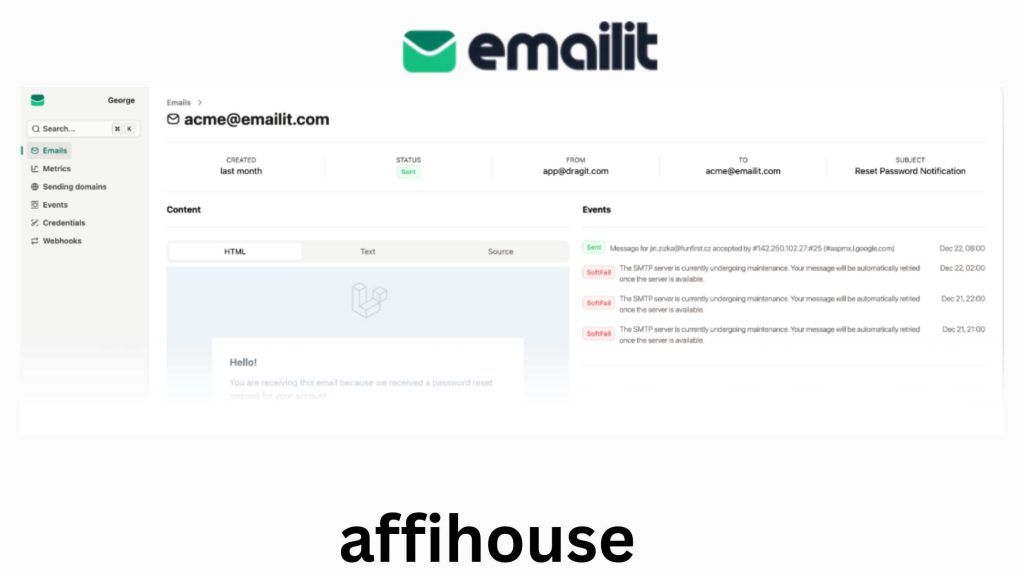
One of the key benefits of Emailit is an all-in-one dashboard for managing campaigns, audiences, and events. It can handle Order confirmations, newsletters, and sophisticated routing to avoid spam filters. Moreover, you can brand it as your own with its white-label options and CNAME support. Appsumo offers it as a lifetime deal, thus you can save your money for the long term since you may not pay monthly or yearly subscription fees for it.
Emailit uses email with SMTP for legacy systems and explores the API for custom integrations in Python, Java, or PHP. This flexibility ensures that your emails reach recipients, increasing interaction and return on investment.
Find more products on Appsumo with a discount price.
Marketing vs Transactional Email: Understanding the Difference
Marketing and transactional email are different in email strategy. Transactional emails are automated, one-to-one emails that are sent in response to user actions such as changing a password or receiving a purchase receipt. They regularly utilize transactional email templates for continuity and place a high value on timeliness and personalization.
In contrast, marketing emails, like newsletters or offers, are promotional mailings to lists. Emailit is great at both: its built-in campaigns control marketing with drag-and-drop builders, and its API quickly sends transactional emails via webhooks. The platform’s verification tools clean lists for improved delivery across types.
Transactional emails have higher open rates (up to 80%), whereas marketing emails create long-term relationships. They are completely connected with Emailit, allowing unified tracking of opens, clicks, and bounces.
How to Start Emailit API Authentication
Authentication is the first stage in integration. In Emailit dashboard, create a workspace and generate an API key under privileges. All requests are secured by this Bearer token; no complex OAuth is needed.
Implement environment variables to safely store the key. Check connectivity before transmitting with a simple ping endpoint if available. According to Emailit’s documentation, one key unlocks emails, webhooks, and analytics.
Configure Emailit’s relays on your server for SMTP users. Use your login and password as your API key, host: smtp.emailit.com, port 587 (TLS). This SMTP email performs well for mixed or non-developmental settings.
Find more products on Appsumo with a discount price.
Sending Emails: Step-by-Step API Guide
Utilize this step-by-step method for effortlessly integrating the Emailit API for effective email sending. A general method for adding the Emailit API to your project is shown below:
1. Create an Emailit Account
- Visit the Emailit website and sign up for an account.
- After signing up, log in to your account to access the API credentials.
2. Get API Key
- Once logged in, navigate to your account settings or API section.
- Copy your API key, as you will need this for authentication during API requests.
3. Install Dependencies
- Install the required components based on the programming language you’re using. In a few languages, you might do this as follows:
For Node.js:
npm install axios
For Python:
pip install requests
4. Set Up Authentication
- Emailit authorizes users with an API key. Make sure your HTTP request headers include the API key.
Example in Node.js:
const axios = require(‘axios’);
const emailitAPIKey = ‘your-api-key-here’;
const headers = {
‘Authorization’: `Bearer ${emailitAPIKey}`,
‘Content-Type’: ‘application/json’,
};
Example in Python:
import requests
api_key = ‘your-api-key-here’
headers = {
‘Authorization’: f’Bearer {api_key}’,
‘Content-Type’: ‘application/json’,
}
5. Create the Email Sending Request
you must set up a POST request for using the API to send an email. This generally includes information like the sender’s email address, subject, body, and recipient.
Example Request in Node.js:
const sendEmail = async () => {
const emailData = {
from: ‘your-email@example.com’,
to: ‘recipient@example.com’,
subject: ‘Test Email’,
body: ‘This is a test email sent via Emailit API.’,
};
try {
const response = await axios.post(‘https://api.emailit.com/send’, emailData, { headers });
console.log(‘Email sent:’, response.data);
} catch (error) {
console.error(‘Error sending email:’, error.response.data);
}
};
sendEmail();
Example Request in Python:
import requests
email_data = {
‘from’: ‘your-email@example.com’,
‘to’: ‘recipient@example.com’,
‘subject’: ‘Test Email’,
‘body’: ‘This is a test email sent via Emailit API.’,
}
url = ‘https://api.emailit.com/send’
response = requests.post(url, json=email_data, headers=headers)
if response.status_code == 200:
print(‘Email sent:’, response.json())
else:
print(‘Error sending email:’, response.text)
6. Handle API Response
You will get a response from the API after sending the email that will let you know if it was sent successfully or not.
Example of Success Response:
{
“status”: “success”,
“message”: “Email sent successfully”
}
Example of Error Response:
{
“status”: “error”,
“message”: “Invalid API key”
}
Is Email Marketing Effective in 2026?
Absolutely, email marketing is still successful, with a $42 return on investment for every $1 spent. Owned channels, like email, perform better than others when algorithms change. On average, open rates are 21%, clicks are 2.3%, and customization is increasing above 30%.
Emailit uses analytics to improve this: segment audiences, automate procedures, and track ROI with UTM links. Its simple design supports small teams to accomplish quick results without needing any agencies.
Email Marketing for Affiliate Marketers
Email lists are important for affiliate marketers. Emergency reminders, product highlights, and greeting series are examples of fostering cycles of Emailit. Use A/B test promotions and classification tags (e.g., “high-converters”).
Compliance is vital: Emailit’s forms allow double opt-ins via API easily. Implement custom events for monitoring commissions and export information to affiliate dashboards.
Email Marketing vs Social Media
Email increases sales and conversions more than social media by up to 4x. Whereas social media builds awareness.
Emailit’s ongoing promotions are less expensive than Mailchimp’s. For hybrid funnels, schedule broadcasts, add social CTAs, and customize at scale.
Conclusion
Emailit’s API, email with SMTP, and transactional email templates improve email tasks. This tool guides you to successful outcomes, particularly in email marketing for affiliate marketers, developers, and ecommerce.
Please explore my website affihouse for more about AppSumo deals, WP plugins, and WP themes.