It is very important for choosing the right control panel in the rapidly growing world of service management and web hosting. It is very crucial to have a proactive and user-friendly control panel if you want to manage high-traffic applications, service websites, and hosting client projects. aaPanel is an open-source and lightweight solution for customers where both free and paid options exist.
Is the best choice for your server management? In this aaPanel review, I will explain a comprehensive study about its features, performance and compared with the competitors. By the end, you will understand clearly about it and make a decision to buy.
What is aaPanel?
aaPanel is an open-source Linus hosting control panel introduced by a Chinese team and it is free. aaPanel manages servers and websites easier due to its clear and user-friendly web-based interface. Users can visually control their servers with just a few clicks without needing any technical knowledge.
It is suitable for most Linux-based environments that why it supports CentOS, Debian, and Ubuntu.Users can easily install and manage web servers (Nginx, OpenLiteSpeed,Apache), databases (MariaDB, PostgreSQL, MySQL), FTP, firewalls, and other components with its modular system.
Key Features of aaPanel
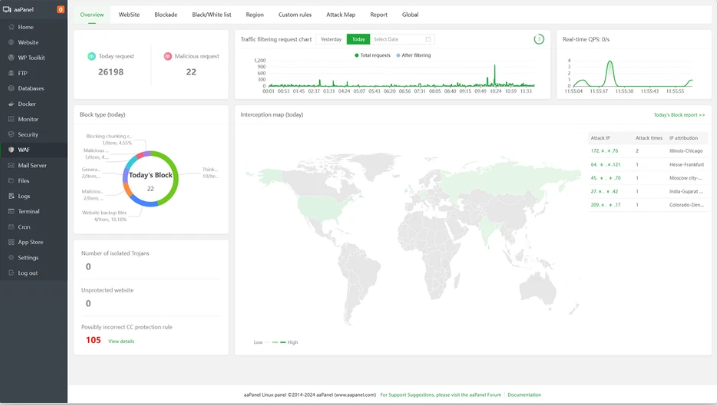
aaPanel is an open-source web hosting control panel used for server control tasks. It is user friendly, that’s why no technical knowledge is required. It offers a wide range of tools and features to manage servers, databases, websites, and more.Following features are mentioned :-
Multiple Server Management
aaPanel supports a lot of server software configurations by default. This feature allows users to manage several services from a single platform , including web servers (Nginx, Apache), databases (Redis, MySQL), PHP versions, and more. Users can save time and effort by installing, configuring, and updating these services without using the command line.
One-Click Installations
aaPanel helps to install popular web applications with just a few clicks. This feature is helpful for web developers or service administrators who want to deploy websites and services quickly. Content management systems (CMSs) like Joomla, Drupal, and WordPress can be installed, as well as other tools and services like full-stack development environments, phpMyAdmin, and Git.
Security Tools
aaPanel offers built-in security features that can help to secure your server and websites.You can configure firewall rules directly from the panel for protecting unauthorized access. It Provides SSL certificates for ensuring encrypted communication between users and your server.
Backup and Restoration
aaPanel allows automatic backup systems to run at specific times and intervals that can minimize the risk of data loss. It also allows restoring backups in the interface. Thus you can recover your important data in case of any server failure.
File Manager
aaPanel allows users to manage their files and control their files though the web interface by integrating file manager. The file manager supports drag-and-drop functionality for managing files.
Database Management
aaPanel makes MYSQL database administration user-friendly by simply creating, editing, and managing databases and users.It allows users to perform more advanced database management tasks directly from the panels by integrating with popular database management tools like PhpMyAdmin.
Resource Monitoring
aaPanel allows you to monitor the performance of your server regularly with its built-in resource monitoring tools. You can track bandwidth, CPU, memory, disk usage with these monitoring tools for better performance.
API Access
API is an important feature of aaPanel that allows it to integrate with other applications. System Administrators and Developers use API to do their tasks automatically such as checking system resources, installing applications, or managing users.
Custom Plugin Support
aaPanel can extend its functionality by supporting different types of official and community-developed plugins. These plugins add support for new applications, services, integrations or increase existing ones.
Why should we use it
Server administrators and businesses can be benefited by using aaPanel. Following findings should consider using aaPanel for managing their web server:
Cost-Effective Solution
Individuals, small businesses, or new businesses can use aaPanel free of cost whereas other popular control panels like Plesk and cPanel have a license fee charge. It is a budget friendly server management solution.
Advanced Security Features
aaPanel offers advanced built-in security tools like firewall manager, IP access control, and SSL certificate for protecting your server from unauthorized access and attacks. It provides security scans on your server to detect and eliminate potential threats.
Free SSL Certificates and Secure Connections
aaPanel provides free SSL certificates for your websites to ensure secure communication (https) between users and your server. Your connection will always be risk free because this ssl certificate is automatically renewable.
Active Community and Support
There is an active and engaged community of users and developers using aaPanel for sharing troubleshooting advice, solutions, and guides to resolve issues.
Low System Resource Requirements
aaPanel works efficiently with limited server resources. It can run in low-end servers or VPS setups without any problems and you can manage other workloads while running the control panel.
Seamless Integration with Cloud Hosting
aaPanel can easily integrate with cloud-based servers like DigitalOcean, AWS because of its lightweight and optimized for cloud environments. It is a great choice for users who are using cloud-based servers and want to manage their server easily.
Drawbacks
Although aaPanel offers many advantages it has some limitations too. Some limitations are shown here:
Limited Advanced Features
aaPanel offers limited advanced features for advanced server administrators. They need advanced configurations using the command line or manually editing configuration files.
Dependency on Third-Party Plugins
aaPanel installed some plugins for extending its functionality. These plugins become outdated or may not work properly sometimes that’s why its functions do not work properly.
Limitations of Documentation
Official documentation may not always be as well-organized as other control panels like cPanel or Plesk. That’s why it is difficult for beginners to find all the queries for any issue.
Performance Concerns with Large-Scale Deployments
aaPanel is efficient and lightweight for small to medium-sized server installations. It might not be the perfect solution for large-scale enterprise-level hosting solutions or websites who have huge traffic.This is because as like aaPanel alternatives it is not capable of managing several high-traffic websites.
Security Risks from Third-Party Tools
Some third-party plugins are at risk for security vulnerabilities due to not updating the plugins. Your server becomes at risk if you do not monitor it regularly.
Pricing
In appsumo you can get aaPanel for $149 with 03 years access and 60 days refundable policy.
Use Cases
aaPanel can be used in various sectors depending on your purpose for server management. Some key use cases are shown:
Web Hosting Management for Small Businesses
Small web hosting providers can manage multiple customer websites and databases on a shared server or VPS by aaPanel. It can set up and manage your web servers like Apache and Nginx for hosting customer websites.
Personal Website Management
aaPanel can help bloggers or small business owners to handle their own personal website by setting up popular CMS platforms like WordPress or Joomla with one-click installer feature.It can set up email services, handle website updates, and provide SSL certificates.
Development and Staging Environment Setup
aaPanel can help developers by providing quickly deploy web applications, manage multiple development, and staging environments with minimal setup and configuration to text website changes before pushing them to the live site.
Managing Multiple Virtual Private Servers (VPS)
aaPanel offers for system administrators a simplified interface to manage several virtual price servers (VPS) for various client projects. It offers a centralized control panel for easy management.
Self-Hosting a Web Application
aaPanel offers a simple and user-friendly interface for deploying and managing web applications like Nextcloud or Plex for those who want to self-host a personal cloud storage service.
Managing a Small E-Commerce Website
aaPanel offers tools to manage web servers, database, and email configurations for small business owners who want to set up and manage e-commerce websites. It also provides SSL installation, security features, and firewall management for ensuring customers safety transactions.
Final Verdict: Is aaPanel the Best Choice?
aaPanel can balance effectively between power and simplicity. It offers impressive capabilities for a free panel where backups, performance optimization, security, and site management are included. Its flexibility and ease of use makes it more reliable for small and medium businesses.
Visit my website affihouse for appsumo lifetime deals, WP plugins, and WP themes.